EvilTokens: how device code phishing beat MFA
Microsoft took down EvilTokens, a phishing service that hit 12,000+ inboxes by abusing the device code sign-in flow. How it worked and how to shut the door.
By Yaamlabs. September 25, 2026, 4 min read, Identity, Phishing, Threat intel.
This week Microsoft published how it took down EvilTokens, a phishing-as-a-service kit that compromised more than 12,000 inboxes at over 10,000 organizations. There was no fake login page and no stolen password. Victims signed in on the real Microsoft site, passed their own MFA prompt, and handed an attacker a working session anyway.
The technique is called device code phishing. Taking down one service does not retire it, and any Microsoft 365 tenant that still allows the device code flow for ordinary users is exposed.
How the attack works
The OAuth 2.0 device authorization flow exists for devices that have no keyboard, such as smart TVs, printers and meeting-room systems. The device shows a short code, you type that code on your phone or laptop at a Microsoft page, and the device is signed in as you.
EvilTokens turned that around. The attacker plays the part of the device.
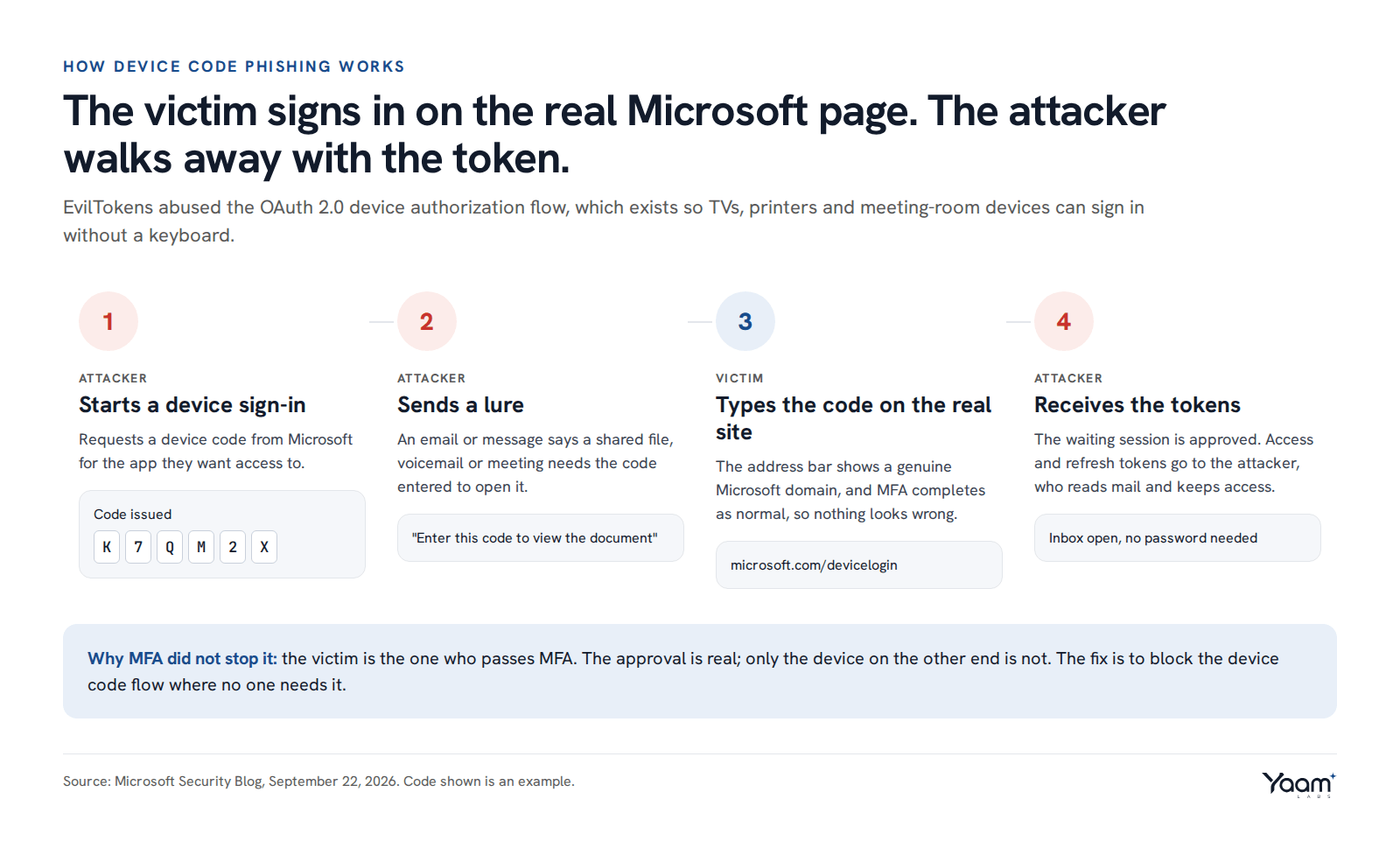
- The attacker asks Microsoft for a device code for the app they want access to.
- They send the victim a lure: a shared document, a voicemail or a meeting that "needs" the code to open.
- The victim goes to the genuine Microsoft sign-in page, types the code, and completes MFA as usual.
- Microsoft approves the waiting session. The access and refresh tokens go to the attacker, who can now read mail and keep coming back.
Every page the victim sees is real, so the usual advice to "check the address bar" does not help. MFA does not help either, because the victim is the one passing it.
EvilTokens by the numbers
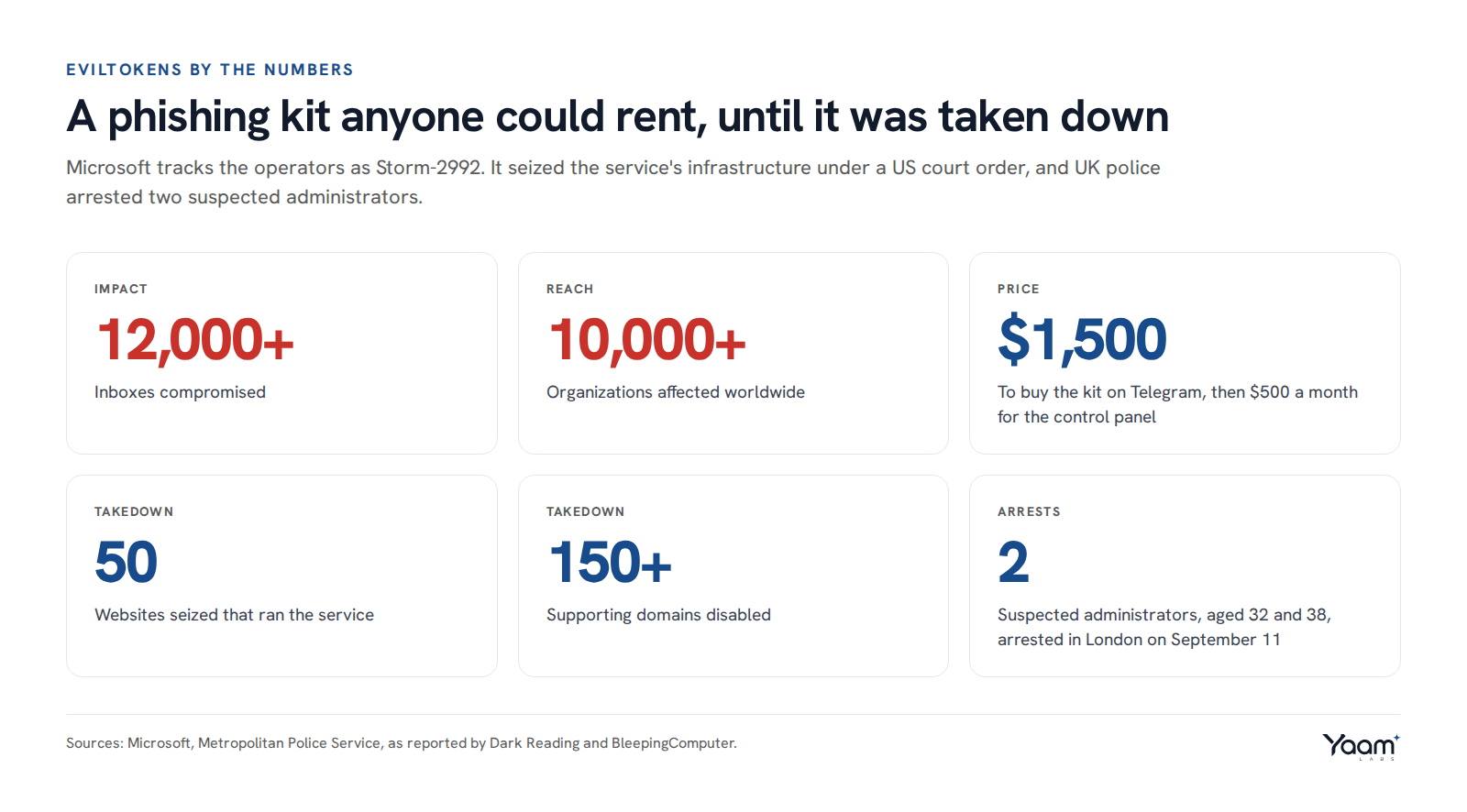
Microsoft tracks the operators as Storm-2992. The kit was sold on Telegram for $1,500, plus $500 a month for the control panel, which put a working MFA bypass in reach of almost anyone. According to reporting on the takedown, the platform also used AI throughout the attack chain, including writing the lures and choosing targets.
Under a US court order, Microsoft and its partners seized 50 websites that ran the service and disabled more than 150 supporting domains. On September 11, the Metropolitan Police arrested two men, aged 32 and 38, in London on suspicion of running it.
Other groups already use the same technique, and everyone who bought the kit still knows how it works. The takedown buys some time to close the gap.
Blocking it in Microsoft Entra ID
Block the device code flow where no one needs it. Create a Conditional Access policy, and under Conditions, then Authentication flows, select Device code flow and set the policy to block. Most users never need the flow. Exclude only the accounts that do, such as meeting-room systems, and limit those to your own network locations.
Find out who uses it today. Before you switch the policy on, filter the Entra sign-in logs by Authentication Protocol: Device code. Running the policy in report-only mode for a week shows the same thing. Legitimate use is usually a short list of room devices and a few command-line tools. Anything else, especially a normal user's account, is worth a closer look.
Know how to cut off a stolen session. Resetting the password does not end a session the attacker already holds. Revoke the user's sessions (in the Entra admin center, or with Revoke-MgUserSignInSession in Microsoft Graph PowerShell), then check for new inbox rules, mail forwarding and app consents the attacker may have added to keep access.
Tell people one simple rule. Never type a sign-in code you did not ask for. If you did not just switch on a device, a code in an email or chat is an attack.
Test it. Device code phishing is part of the identity checks in our safeguarding and hardening work, and we watch for it in security operations. If you want to know whether your tenant would stop it, open the chat and Yaali, our AI agent, will pass your question to the engineer who would run the check.
Sources: Microsoft Security Blog, Dark Reading, BleepingComputer, Security Affairs.
Read next
- Four exploited flaws to patch before the weekend
- n0n ransomware threatens to destroy your backups
- 974 fixes in one Patch Tuesday: what to patch first
Back to the blog, or tell us about your system in the chat. Yaali, our AI agent, answers first and brings in an engineer.