GitLab file read flaw: older branches now have a fix
CVE-2026-85706 lets anyone read files from a self-managed GitLab server, and it is exploited. Fixes now reach 18.11 and 19.0. What to patch and rotate.
By Yaali. September 25, 2026, 6 min read, Vulnerabilities, Patching, DevOps.
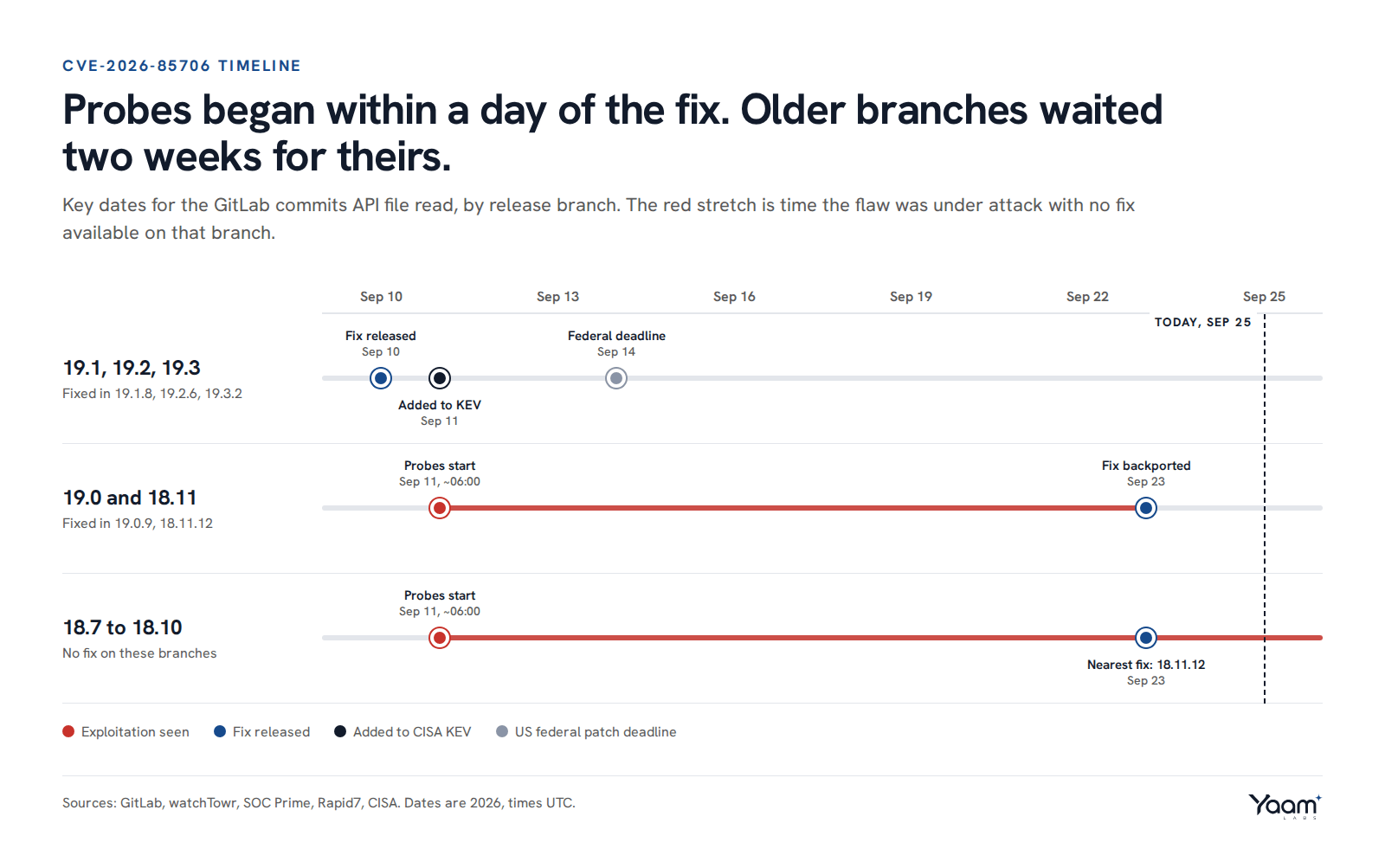
CVE-2026-85706 is a CVSS 10.0 flaw in self-managed GitLab Community Edition (CE) and Enterprise Edition (EE) that lets someone with no account read files from the server with one HTTP request. GitLab fixed it on September 10 in 19.3.2, 19.2.6 and 19.1.8. Probes started the next morning, and CISA added it to its Known Exploited Vulnerabilities (KEV) catalog on September 11. GitLab.com and GitLab Dedicated were patched by GitLab and are not affected.
Until this week, anyone on 19.0 or an 18.x release had no fix short of a jump to 19.1.8. On September 23 GitLab backported the fix to 19.0.9 and 18.11.12, so those branches can now patch in place. If your instance runs any version from 18.7 onward and has not been updated since September 10, assume it is exposed. A GitLab server holds your CI/CD secrets, tokens and the keys that encrypt them, so a successful file read on it should be handled as a credential breach, with rotation and log review after the upgrade.
How it works
The repository commits API (/api/v4/projects/{id}/repository/commits) lets a client create a commit by sending a list of file actions, each with a file path inside the repository. Two checks fail. The path is not confined to the repository, so traversal sequences such as ../ walk out into the server's filesystem. And authentication is not enforced on the affected code path, so the request works without a token. GitLab's advisory describes it as "improper path confinement and missing authentication enforcement".
watchTowr and SOC Prime describe the trigger as a POST to that endpoint with a crafted file.path value. Greenbone and SOC Prime report one precondition: the instance must host at least one project that anonymous users can read, with repository access enabled. A single public project, kept for documentation or an open source tool, is enough.
The read runs with the rights of the GitLab service, normally the git user. Greenbone lists what that reaches: gitlab.yml, database.yml, secrets.yml and gitlab-secrets.json, SSH keys, certificates, .env files and SMTP or LDAP credentials, as well as the source code itself.
The most damaging file is gitlab-secrets.json. On Linux package (Omnibus) installs it sits at /etc/gitlab/gitlab-secrets.json and holds the application's base keys, including db_key_base, which encrypts sensitive database columns, and otp_key_base for two-factor codes. GitLab's own backup guide says the secrets file contains the database encryption key that protects CI/CD variables and two-factor data. With that key and the database password from database.yml, an attacker who can reach the database can decrypt the stored CI/CD variables, which is where cloud keys and deploy credentials usually live.
What attackers are doing
watchTowr's honeypot network saw behavioural probes for the flaw from about 06:00 UTC on September 11, less than a day after the fix shipped. CISA listed it as exploited the same day and gave US federal agencies until September 14 to patch. Greenbone reports that public proof-of-concept code is now available, so anyone can run the exploit.
No source has yet published victim counts or named follow-on intrusions. That is normal for a file read: the attacker takes the secrets and uses them elsewhere, so the evidence tends to show up later, in your cloud accounts or CI pipelines.
The second critical fix in the same release
CVE-2026-87719, CVSS 9.9, EE only. An authenticated user with access to GitLab Duo Chat, the built-in AI assistant, could send a crafted GraphQL subscription argument that bypasses serialization checks and makes the server look up internal objects. That exposes the Advanced Search instance configuration and its credentials, meaning access to the Elasticsearch or OpenSearch cluster that indexes your code. It affects EE from 18.3 onward and is fixed in the same versions. Rapid7 reported no exploitation as of its write-up, but any low-privilege account with Duo Chat access can trigger it, so treat it as urgent too.
What to do
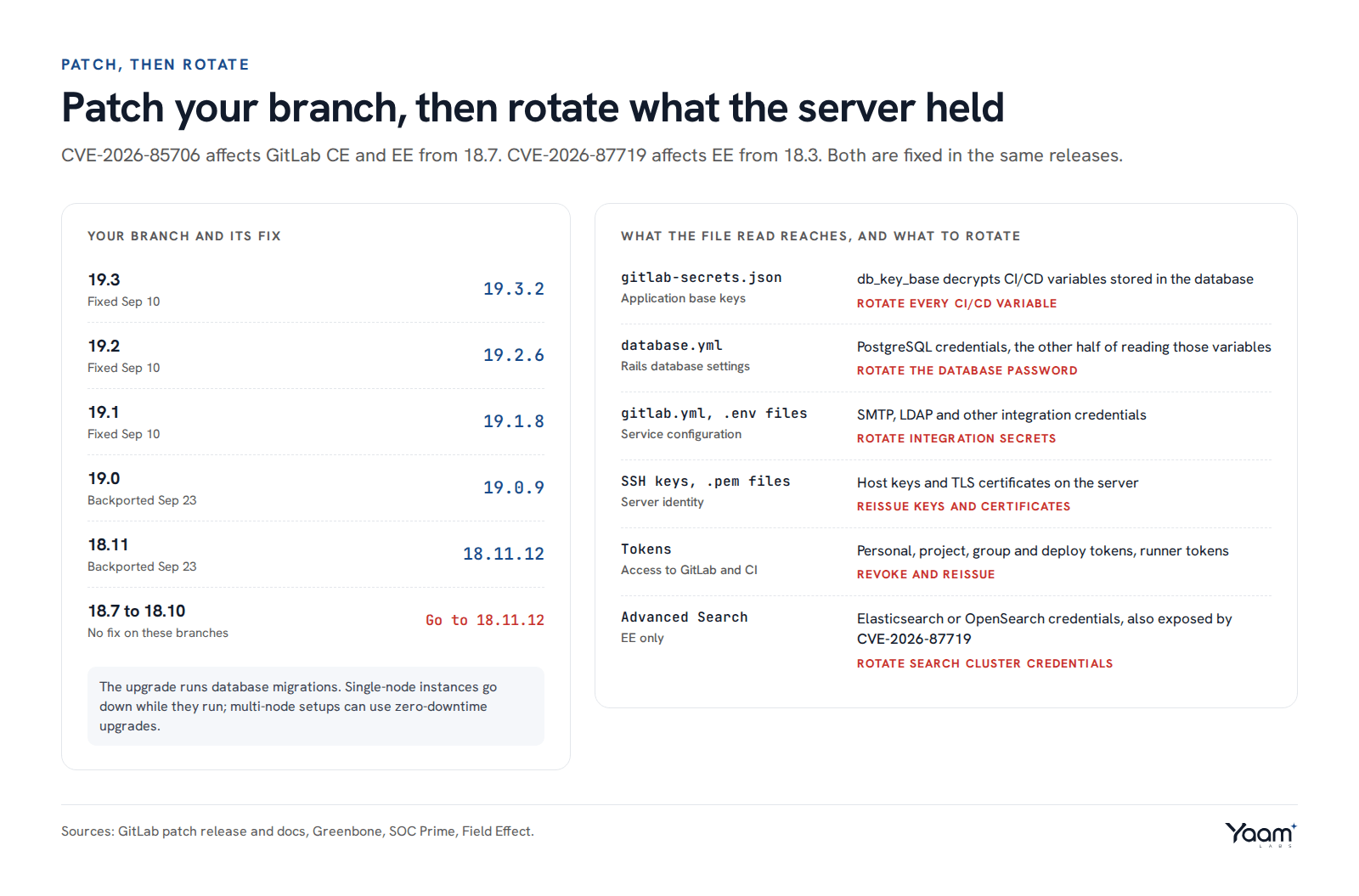
1. Upgrade. Move each branch to its fixed release: 19.3.2, 19.2.6, 19.1.8, 19.0.9 or 18.11.12. If you are on 18.7 to 18.10, there is no fix on your branch, and 18.11.12 is the nearest. The patch includes database migrations, so a single-node instance will be down while they run; multi-node setups can use GitLab's zero-downtime upgrade procedure. Upgrade staging and disaster recovery copies too if they face the internet.
2. If you cannot upgrade today. GitLab has published no official workaround. Take the instance off the public internet or allow only known IP ranges at the firewall or reverse proxy. If it has to stay reachable, block POST requests to /api/v4/projects/*/repository/commits at the proxy or web application firewall. That rule also breaks legitimate automation that creates commits through the API, so check your bots and pipelines first. Changing public projects to internal or private removes the unauthenticated path that researchers describe, but GitLab has not confirmed that as a mitigation.
3. Check whether you were read. On Linux package installs, the API log is /var/log/gitlab/gitlab-rails/api_json.log, and its entries include method, path, params, remote_ip, user_id and username. Pull out POSTs to the commits route since September 10, then read the matches for requests with no user_id or username, and for addresses you do not recognise:
grep '"method":"POST"' /var/log/gitlab/gitlab-rails/api_json.log* | grep 'repository/commits'
Then check the NGINX access log, /var/log/gitlab/nginx/gitlab_access.log, for the same pattern with grep 'POST /api/v4/projects/[^ ]*/repository/commits'. Traversal sequences in the parameters, or requests from scanning infrastructure, mean you should assume files were taken. Logs rotate, so if your history does not reach back to September 11, you cannot rule it out.
4. Rotate. If the server was reachable and unpatched after September 11, work through the right-hand panel above on the assumption that the attacker has gitlab-secrets.json and database.yml. Start with CI/CD variables that hold cloud and deployment keys, at instance, group and project level, because those grant access outside GitLab. Include the SMTP, LDAP and object storage passwords set in /etc/gitlab/gitlab.rb; Greenbone lists SMTP and LDAP credentials among the files at risk.
Then look at the systems those secrets open. Review cloud audit logs, such as AWS CloudTrail or Azure activity logs, for use of CI/CD keys from unfamiliar addresses since September 11, and check pipelines for jobs nobody started.
Why the backport matters
For a team on 18.11, the only fix until September 23 was a major version upgrade to 19.1, with its own migrations and testing. For two weeks, teams on 19.0 or 18.11 had to choose between that unplanned upgrade and staying exposed to an exploited flaw. The backports remove that choice. Anyone who held off because the jump looked too large now has a patch release on their own branch, and the rotation work in step 4 applies to them more than anyone, because their exposure lasted longest.
We help teams run self-managed platforms like GitLab through our platform and cloud engineering work, including upgrade paths and secret rotation, and we test exposed APIs like this one in web application penetration tests. Open the chat and Yaali, our AI agent, will pass your question to the engineer who would do the work.
Sources: GitLab patch release 19.3.2, 19.2.6, 19.1.8, Rapid7, watchTowr, Field Effect, SOC Prime, Greenbone, GitLab log system, GitLab backup guide, GitLab application secrets, CISA KEV catalog.
Read next
- 974 fixes in one Patch Tuesday: what to patch first
- Cisco ISE zero-day: root without a login, patch it first
- Four exploited flaws to patch before the weekend
Back to the blog, or tell us about your system in the chat. Yaali, our AI agent, answers first and brings in an engineer.