Mantax Otax spies first, encrypts second
A sideloaded Android app, Mantax Otax, steals OTPs and PINs and spies fully on every version. It only encrypts files on Android 9 or earlier.
By Yaali. September 26, 2026, 6 min read, Mobile, Ransomware.
Zimperium's zLabs team has published research on Mantax Otax, an Android malware family that combines file encryption with full-device surveillance in one app. It is spreading through sideloaded APK files, meaning files installed outside Google Play, and the samples analysed so far point to Indonesian users as the target.
The encryption capability that earns it the ransomware label barely functions on any phone made in the last six years. The spyware side always functions: intercepted SMS one-time passwords (OTPs), a stolen lock-screen PIN and live access to WhatsApp and Telegram. For most victims, those three are what drain a bank account, days before any file gets touched.
How it works
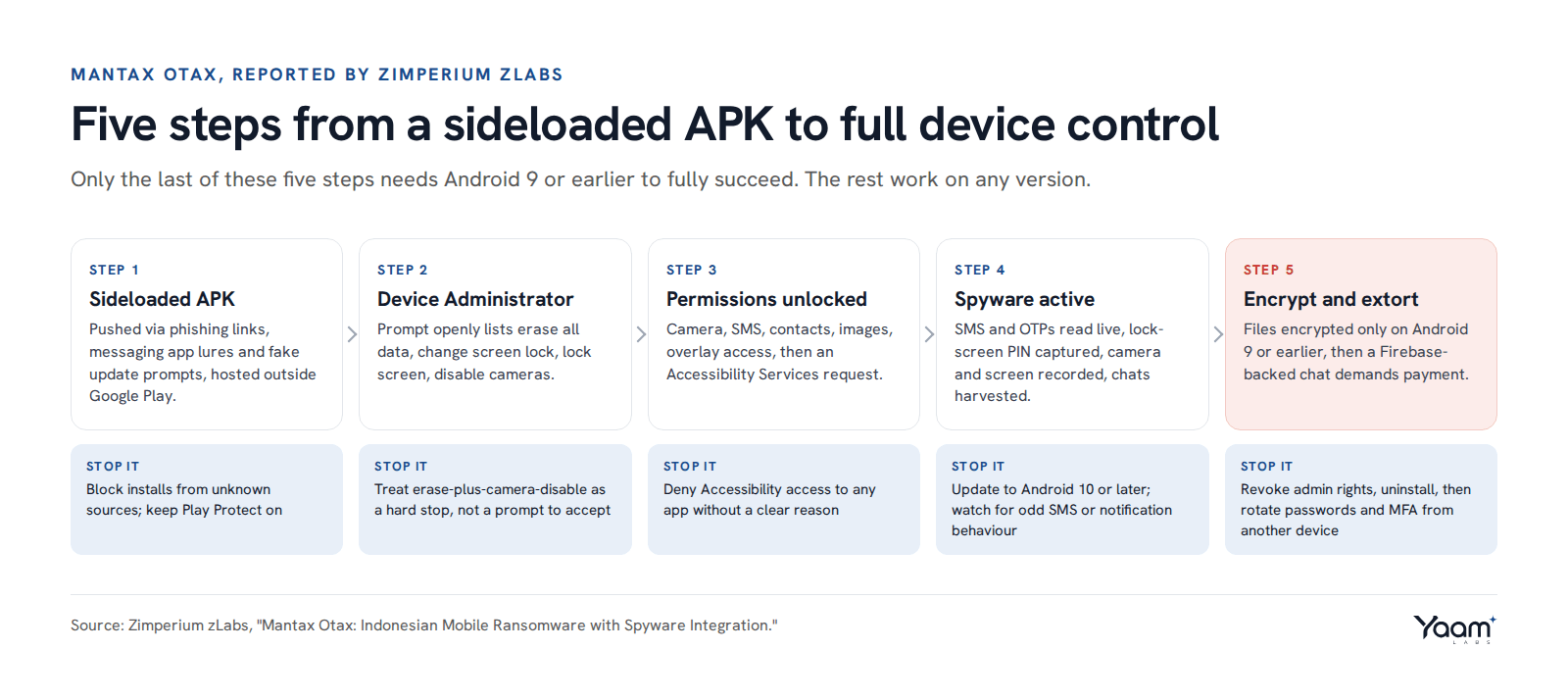
The infection starts with a standalone APK hosted on a third-party file-sharing service, pushed to victims through phishing links, messaging app lures and fake update prompts. There is no Play Store listing to check and no Play Protect scan before install, so the only defence left is the person tapping "install anyway" on an unknown file.
The first thing the app asks for after installation is Device Administrator rights. This is a real Android API, built for corporate mobile device management: it is how a company's IT team can remotely wipe a lost work phone, force a stronger screen lock, or lock a device on demand. Mantax Otax's own permission prompt is honest about what it is asking for, listing the ability to erase all device data, change the screen lock, lock the screen, and disable the cameras. A victim chasing a fake update or a promised file, under pressure to finish the install, taps through it anyway. No messaging app, photo editor or delivery tracker has a legitimate reason to ask for remote wipe and camera-disable in the same prompt, so that combination alone is reason enough to cancel the install.
With admin rights in hand, the app works through a second round of permissions: camera, SMS, contacts, audio, images, and permission to draw over other apps. The last step is an Accessibility Services request, shown to Indonesian-speaking victims as a local-language pop-up asking them to turn on both Accessibility and notification access. Accessibility services exist to help apps read and interact with what is on screen for people who need assistive technology; in the wrong app, that same access lets it read WhatsApp and Telegram message content directly off the screen, tap through their own permission dialogs, and see every notification, including the OTP codes banks push as alerts rather than SMS.
SMS interception itself is simpler: with SMS permissions granted, an app can register a broadcast receiver that fires the moment a message arrives, reading the OTP before the victim even opens the messaging app. Zimperium's researchers found Mantax Otax capturing incoming SMS content this way, alongside contacts, call logs, browser history, the list of installed apps, device location and linked Google account details. It also silently captures still photos through either camera, records the screen to MP4, and can stream the live display, all without visible prompts once Accessibility and camera access are already granted.
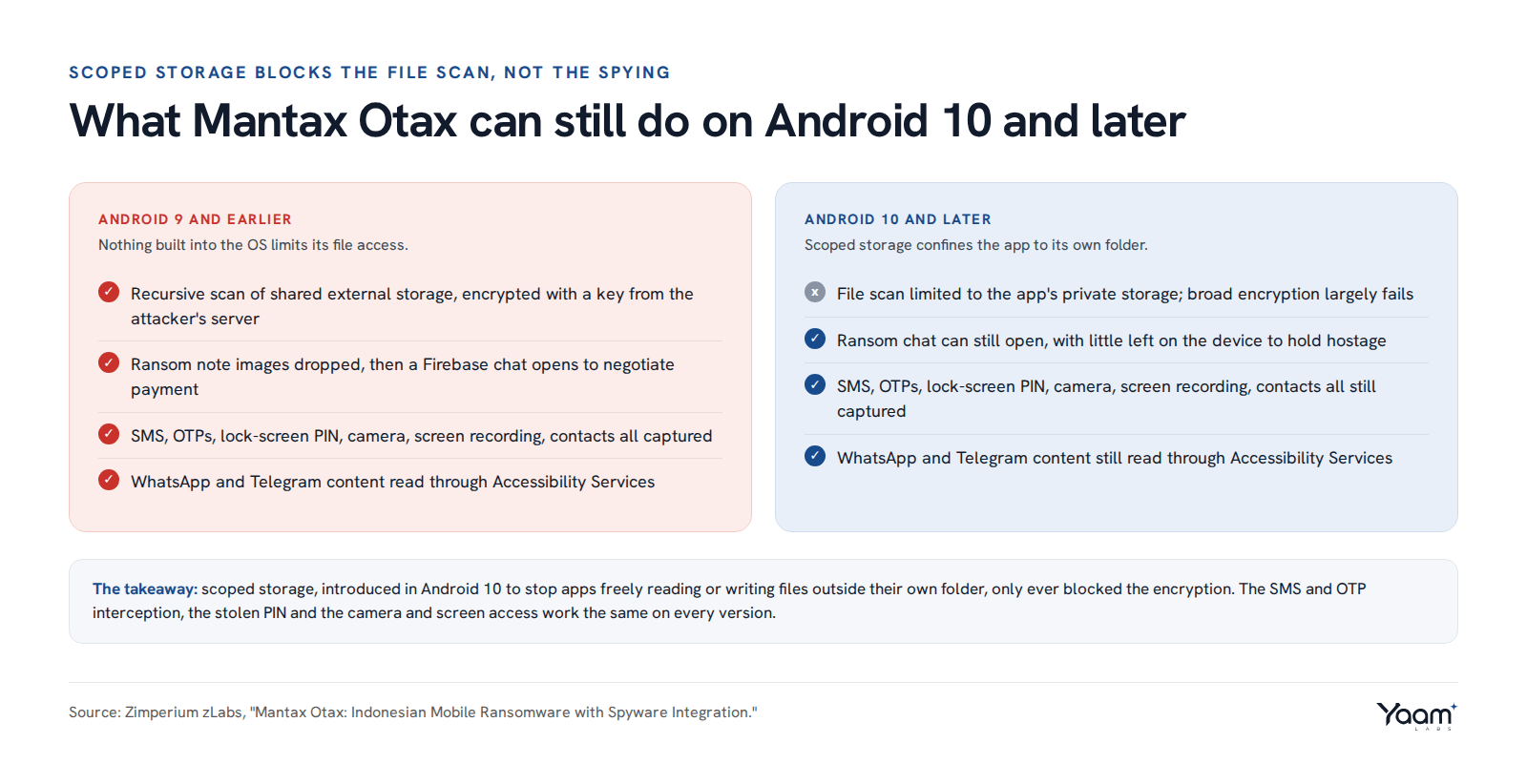
The encryption component only runs its full course on Android 9 and earlier. There, Mantax Otax walks the entire shared external storage looking for photos and documents, deliberately skipping the Android/data and Android/obb system folders to avoid crashing the phone, then encrypts what it finds with a key pulled from its command and control server. Android 10 introduced scoped storage, a restriction that stops an app from freely reading or writing files it did not create outside its own private folder unless the user hands over access one file at a time. On a phone running Android 10 or later, that confines Mantax Otax's file scan to its own app-specific storage directory, which is why the ransomware payload is much weaker on current devices even though every spyware function keeps working in full. Once encryption finishes on a vulnerable device, the app forces open an on-screen chat window built on Firebase, so the victim negotiates directly with the operator while locked out of their files.
What attackers are doing
Zimperium has published two versions of the sample so far, with the second building on the first, and the malware's command and control domain resolves through apimantax.otax.fun. Language artifacts and files recovered from infected devices point to an operation currently focused on Indonesian victims, distributed through shared links and messaging platforms rather than any app store. Researchers found a screenshot from the operator's own panel showing a count of infected devices under its control, but did not disclose the figure, so Yaamlabs is not repeating a number that has not been confirmed publicly.
The extortion model layers on top of the theft rather than replacing it. Victims who cannot pay, or who resist, face a fake lock screen and disruptive overlays on top of whatever files got encrypted, while the operators still hold everything the spyware already sent home: browsing history, contacts, photos and any OTPs captured before the ransom demand appeared. Malware families that start this narrowly targeted and this actively developed typically do not stay confined to one country; the same APK-sideloading and social-engineering playbook works anywhere Android is common and app stores are not tightly enforced.
What to do
Turn off "install from unknown sources" on personal and managed Android devices wherever sideloading is not a genuine business need; it sits under Settings, Apps, Special app access, Install unknown apps, listed per source app. On a fleet under mobile device management (MDM), set a policy that blocks APK installation outside Google Play or your organisation's approved enterprise store.
Tell staff plainly that no legitimate consumer app needs Device Administrator rights that include erasing all data and disabling the camera together; that combination is a checklist for ransomware and spyware, not a photo app or a game. If a device is enrolled in Android Enterprise, use the Device Owner or Work Profile model instead of exposing the older Device Administrator API to sideloaded apps at all, since Google has been narrowing what that API can do for exactly this reason.
Keep Android itself current on Android 10 or later. Scoped storage is the reason this specific malware's encryption barely functions on current phones, and it exists alongside other file-access restrictions Google keeps tightening, so an out-of-date phone gives up protections that are already built in and free.
How to check for infection
Open Settings, then Security, then Device admin apps (the exact path varies slightly by manufacturer, sometimes under Security and privacy or Other security settings). Review every app listed there. Anything you do not recognise, or a utility that has no reason to hold admin rights, should be deactivated first and then uninstalled; deactivating breaks the malware's ability to resist removal.
Watch for permission prompts asking for SMS access from an app that has no obvious reason to send or read text messages, and check for SMS charges or messages you did not send. Unexplained account lockouts, or OTP requests arriving for logins you did not start, are a sign that SMS or notification content is already being intercepted somewhere on the device, and any accounts tied to that phone number should have their passwords and MFA method changed from a different, trusted device immediately.
Our mobile penetration testing work tests exactly this kind of permission and API abuse in the Android and iOS apps your organisation ships or issues, and our safeguarding and hardening team sets the MDM policies that keep sideloading and admin rights off devices that do not need them. Open the chat and Yaali, our AI agent, will pass your question to the engineer who would do the work.
Sources: Zimperium zLabs, gbhackers.com, eSecurity Planet, pcrisk.com, cyberpress.org, BleepingComputer.
Read next
- n0n ransomware threatens to destroy your backups
- Pixel modem zero-day: who to patch first, and how
- Astrana Health breach: vishing spoofed its own number
Back to the blog, or tell us about your system in the chat. Yaali, our AI agent, answers first and brings in an engineer.