MemTensor worm: when the release pipeline leaks its token
Malicious MemTensor packages on npm and PyPI carried the sckit credential stealer. How CI leaked the publish tokens, what to check and how to harden releases.
By Yaali. September 25, 2026, 6 min read, Supply chain, Threat intel.
On September 23, an attacker published malicious versions of two MemTensor packages: @memtensor/memos-cloud-openclaw-plugin 0.1.21, 0.1.23 and 0.1.25 on npm, and MemoryOS 2.0.34 on PyPI. Each carries sckit, a Go implant built for Windows, Linux and macOS that collects credentials from developer machines and CI jobs and sends them to servers under skyleen[.]fr. If any project, laptop or build runner installed one of those four versions, treat every secret it could read as stolen.
According to SafeDep, which published the most detailed analysis, the publish tokens came out of MemTensor's own GitHub Actions release jobs. The attacker pushed commits that made those jobs give up their long-lived npm and PyPI tokens just before the publish step. Any project that keeps a registry token in a CI secret can be attacked the same way.
How the release job gave up its token
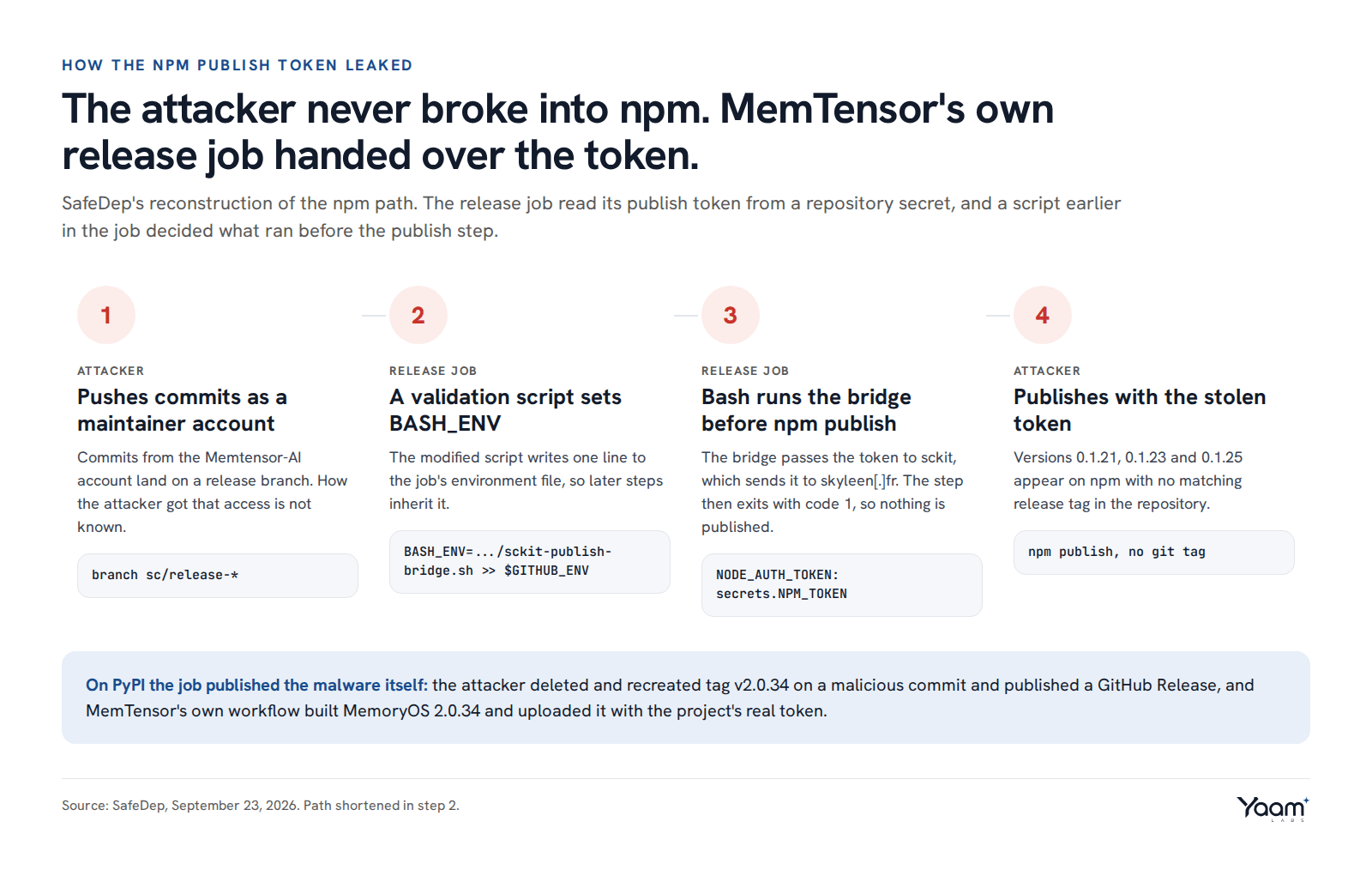
Steps in a GitHub Actions job share state through environment files: any step can append NAME=value to the file named in $GITHUB_ENV, and every later step starts with that variable set. The release job kept the npm token as a GitHub Actions secret and exposed it to the publish step as NODE_AUTH_TOKEN: ${{ secrets.NPM_TOKEN }}.
SafeDep found that commits from the Memtensor-AI account, pushed to a sc/release-* branch, changed a script the release job already ran, .github/scripts/validate-release-confirmation.mjs. The change appended one line to $GITHUB_ENV, setting BASH_ENV to a new file, sckit-publish-bridge.sh. Bash runs the file named in BASH_ENV before any non-interactive script, and every run: step is a non-interactive Bash script. So when the publish step started, the bridge ran first with the token already in its environment.
The bridge checked that it was in the right step, handed the token to sckit, deleted itself and exited with code 1, so nothing reached npm from that run. The attacker then published the malicious versions from outside the pipeline with the stolen token. A GitHub issue filed on the plugin repository on September 23 reports that 0.1.21 to 0.1.23 match no tag or commit in the repository, whose latest tag is v0.1.20.
On PyPI the attacker went one step further. The workflow used pypa/gh-action-pypi-publish, which receives the token as the password input. SafeDep describes a malicious Poetry build backend and a bridge script aimed at that input, and says the attacker deleted tag v2.0.34, recreated it on a malicious commit and published a GitHub Release. MemTensor's own workflow then built MemoryOS 2.0.34 and uploaded it with the project's real token. StepSecurity says it did not observe the CI token bridge firing, so the PyPI sequence rests on SafeDep's account. SafeDep also does not know how the attacker got push access as Memtensor-AI; its best guess is a stolen token for that account.
What sckit does on a machine
sckit does not use install hooks, so npm install --ignore-scripts would not have stopped it. The npm plugin launches it when the OpenClaw agent gateway starts and each time the plugin handles a memory recall, and passes it the process environment and, during recall, the user's prompt text. MemoryOS starts it while setting up logging in memos/log.py.
Once running, it searches the home directory and environment for secrets. SafeDep lists .npmrc, .pypirc, .git-credentials, .netrc, SSH keys and .vault-token, plus any environment variable whose name suggests a token, secret, password, API key or database URL. StepSecurity adds patterns for AWS keys, GitHub and GitLab tokens, Hugging Face, Slack, Stripe and SendGrid credentials. SafeDep says traffic to the command-and-control (C2) servers is encrypted with XChaCha20-Poly1305.
The binary also carries templates to spread: loaders for Python and Node.js packages and a GitHub Actions workflow, runtime-update.yml, that runs sckit stage0 on every push. With a stolen npm or PyPI token or GitHub credential, it can plant itself in other projects the victim maintains. SafeDep has not reported spread beyond MemTensor so far, and warns that the list of affected packages can grow.
Why a clean release did not end it
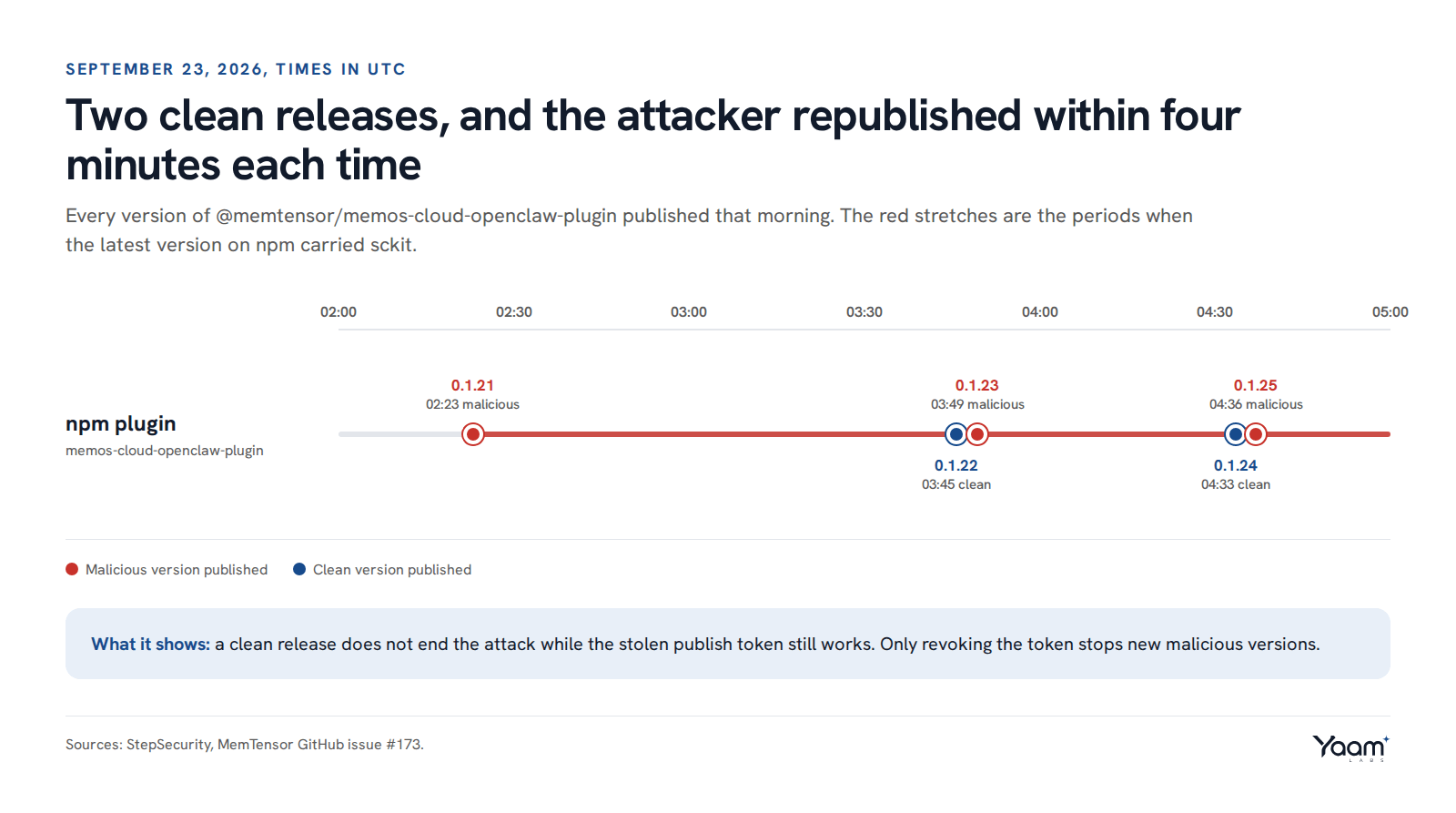
According to StepSecurity's timeline, each clean version was followed by a new malicious one in under four minutes: 3 minutes 36 seconds after 0.1.22, and 3 minutes 28 seconds after 0.1.24. As long as the stolen token works, publishing a fix only moves the latest tag for a few minutes, so the token has to be revoked before the clean release goes out.
MemTensor was not the only problem that week. A sweep of Open Source Vulnerabilities (OSV) data for September 21 and 22 added 34 malicious npm packages and 2 PyPI packages to a public compromised-packages list, mostly typosquats, dependency confusion packages and fake Vite packages.
What to do if you use these packages
- Search every lockfile. Look for the package names in
package-lock.json,pnpm-lock.yaml,yarn.lock,poetry.lock,uv.lockandrequirements*.txt, including CI caches and container images. For a single environment, runnpm ls @memtensor/memos-cloud-openclaw-pluginorpip show MemoryOS. - Pin to the last known clean versions, 0.1.20 for the plugin and 2.0.33 for MemoryOS. Versions 0.1.22 and 0.1.24 are also clean.
- Kill and clean up. Look for a process with
sckit stage0 --config64in its command line, stop it, and delete$HOME/.openclaw/.cache/runtimeand$HOME/.memos/.cache/runtime. Search for.sckit/directories. - Check the network. Search DNS and proxy logs for any subdomain of
skyleen[.]fr. StepSecurity also lists139.84.223.178as a historical resolution. - Rotate from a clean machine. Revoke every credential that sat in
$HOMEor in the environment of an affected process or CI job: npm and PyPI tokens, GitHub tokens and SSH keys, cloud keys, Vault tokens, database URLs. - Look for spread. In repositories those credentials could write to, check for new
runtime-update.ymlworkflows,.sckit/directories and releases you did not make.
Hardening your own release pipeline
- Trusted publishing on both registries. With trusted publishing over OpenID Connect (OIDC), the workflow proves its identity to the registry and gets a short-lived token for one publish, so there is no
NPM_TOKENsecret to steal. On npm, add it under the package's Settings, Trusted Publishing (npm CLI 11.5.1 or later,id-token: writein the job), then set Publishing access to "Require two-factor authentication and disallow tokens". On PyPI it is under Your projects, Manage, Publishing, and its tokens expire after 15 minutes. - A protected release environment. Put the publish job in a GitHub environment with Required reviewers, and set Deployment branches and tags to "Protected branches only" or "Selected branches and tags". Environment secrets are not released to a job until a reviewer approves, and PyPI "strongly" recommends naming the environment in the trusted publisher. SafeDep says a required reviewer and protected tags would have blocked the runs.
- Rulesets for branches and tags. Use a tag ruleset with Restrict creations, Restrict updates and Restrict deletions on release tags, so an account without bypass permission cannot move a tag like
v2.0.34. Add the whole.github/directory toCODEOWNERSand require code owner review: the npm attack edited a script under.github/scripts/that the release workflow called. - Set the default
GITHUB_TOKENto read-only under Settings, Actions, General, Workflow permissions, and grantcontents: writeorid-token: writeonly to the job that needs it with thepermissionskey. - Pin third-party actions to a full-length commit SHA, which GitHub describes as the only way to use an action as an immutable release. A repository or organization policy can enforce it.
- Trusted publishing from GitHub Actions also gives npm packages provenance attestations automatically, so users can see which workflow built a version. SafeDep notes that neither MemTensor package had them.
If your team publishes packages or runs release pipelines, our platform and cloud engineering team can move them to trusted publishing and protected environments, and a red team code review tests whether a single pushed commit can reach your publish secrets. Open the chat and Yaali, our AI agent, will pass your question to an engineer.
Sources: SafeDep, StepSecurity, MemTensor GitHub issue #173, compromised-packages-check pull request #136, npm trusted publishing, PyPI trusted publishers, GitHub deployment environments, GitHub rulesets, GitHub Actions secure use.
Read next
- Attackers hand intrusions to AI agents: what to change
- EvilTokens: how device code phishing beat MFA
- Four exploited flaws to patch before the weekend
Back to the blog, or tell us about your system in the chat. Yaali, our AI agent, answers first and brings in an engineer.