TeamFiltration: the M365 accounts MFA never covered
TeamFiltration hit 5,714 Microsoft 365 accounts with 32,825 login attempts, but only 7 fell: forgotten service accounts with no MFA. What to check now.
By Yaali. September 26, 2026, 6 min read, Identity, Threat intel.
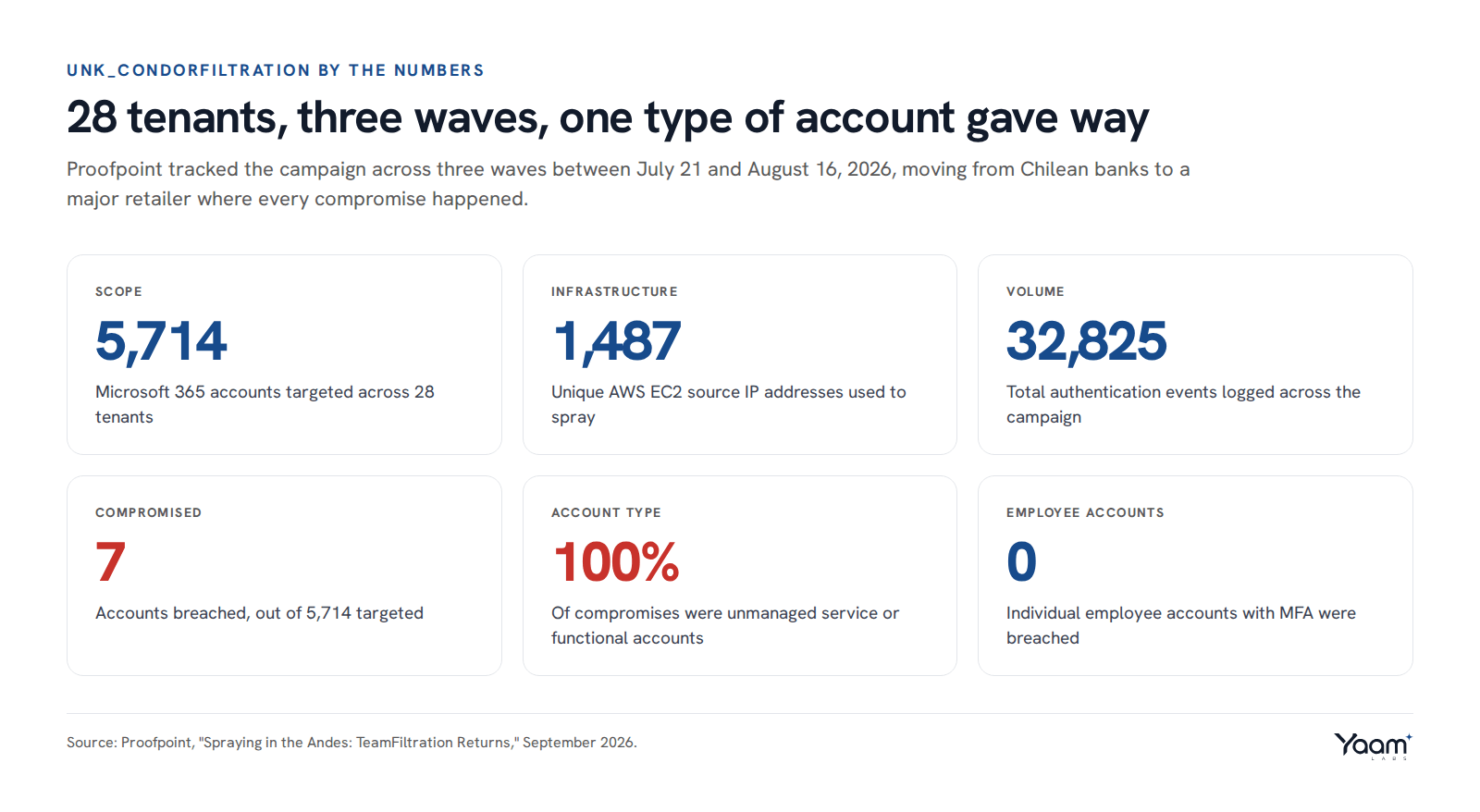
Proofpoint has disclosed an active campaign, tracked as UNK_CondorFiltration, that ran 32,825 authentication attempts against 5,714 Microsoft 365 accounts across 28 tenants between July 21 and August 16, targeting Chilean banks, a large financial institution and a major retailer. The attacker used TeamFiltration, an open source Microsoft 365 attack framework, and 1,487 different AWS EC2 IP addresses to spread the attempts out and dodge IP-based blocking.
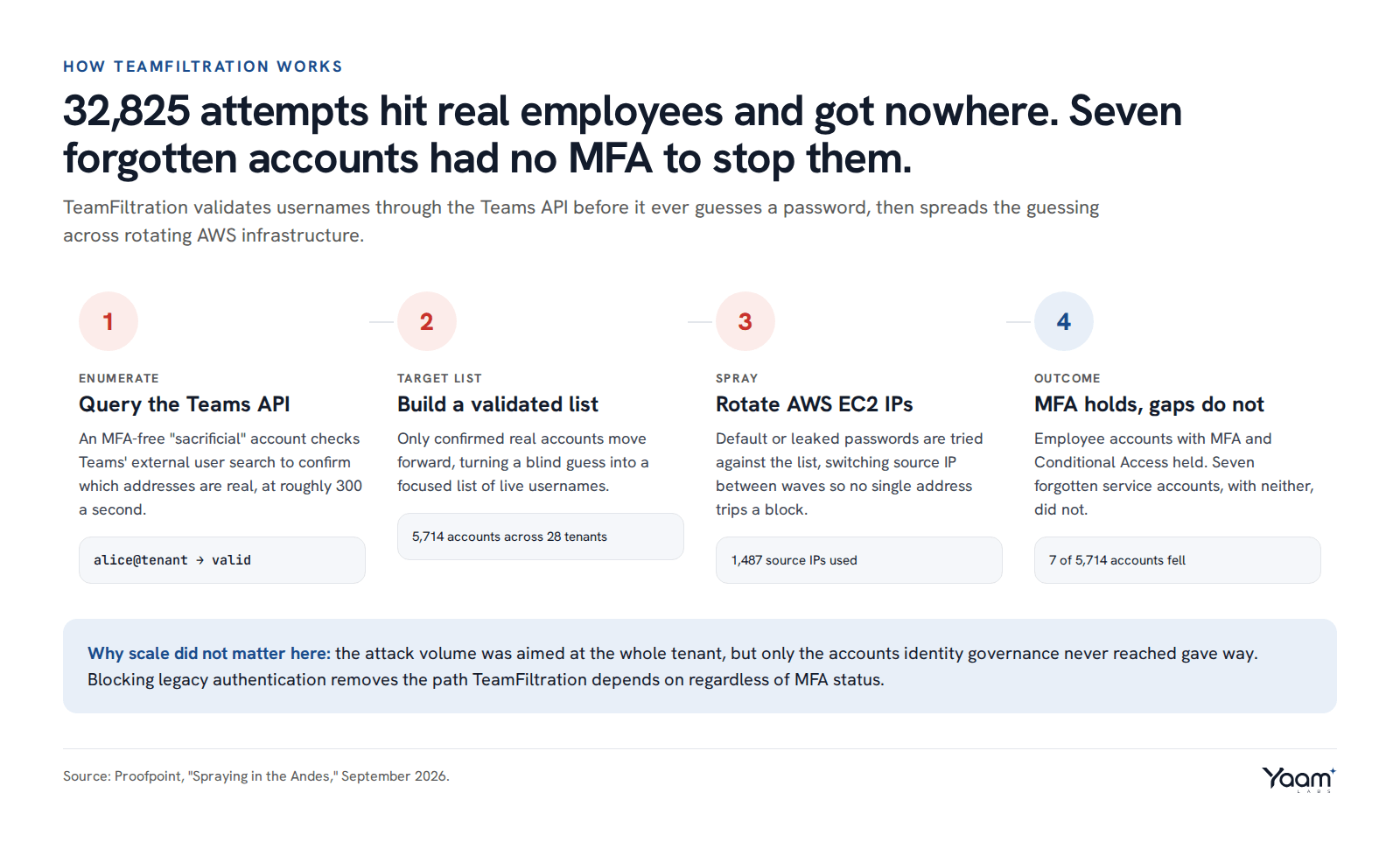
Only seven accounts gave way. Every one of them was a forgotten, unmanaged service account with a default password and no MFA enrolled, doing jobs like ticket management, supplier payment approval and point of sale operations. The 32,825 attempts against real employee accounts went nowhere; the seven that fell were the accounts nobody was watching.
How it works
TeamFiltration does not guess blindly at email addresses. It first confirms which ones are real. The tool signs in with a "sacrificial" Microsoft 365 account that has no MFA and no Conditional Access policy attached, then uses that account's token to query Microsoft Teams' external user search, the lookup Teams runs whenever you type a name to search for someone. Teams answers whether the address belongs to a real account in the target tenant, and TeamFiltration can run that check at roughly 300 addresses a second.
That turns password spraying from a blind guessing game into a targeted list of confirmed, live usernames before a single password is tried. Once it has that list, TeamFiltration sprays a small number of passwords, often default or previously leaked ones, across the whole list, and it rotates the AWS EC2 instance it sprays from between waves. Rotating source IPs defeats defenses that block or throttle by IP address, since no single address ever sends enough failed logins to trip a rate limit on its own.
Forgotten service and functional accounts are disproportionately exposed to this. They exist to let an integration, a scheduled job or an unattended process sign in without a person present, so an MFA prompt would break them, and teams routinely leave MFA off for exactly that reason. They are also commonly excluded from the Conditional Access policies that apply to "real" named users, because someone once had to unblock an automation and set an exception that was never revisited. Nobody logs into them by hand, so nobody notices a stale password, and nobody reviews them the way an offboarding checklist would review an employee's account.
What attackers are doing
Proofpoint saw the campaign run in three waves. The first, July 21 to 24, hit two Chilean banks at a modest 100 to 120 accounts a day. The second, July 26 to 28, jumped to a peak of 1,520 accounts targeted on July 27, still against banking targets. The third wave, August 13 to 16, turned to a major Chilean retailer that alone accounted for 78.3 percent of all observed events in the campaign, peaking at 1,560 accounts targeted on August 15. All seven successful compromises happened during that third wave, within about ten minutes of each other.
Once inside a service account, the attacker moved fast. Proofpoint traced one case where, about 90 seconds after the successful sign-in, the same session appeared from a German VPN exit node and tried to authenticate into the victim's corporate VPN portal, an attempt that Conditional Access blocked. In the same window, the attacker used the compromised account's Microsoft 365 access to reach OfficeHome, the Azure Portal and SharePoint Online, consistent with TeamFiltration's built-in mode for pulling email, Teams messages and OneDrive files automatically once it holds a valid session. None of this needed a second exploit; a Microsoft 365 sign-in already carries that reach.
What to do
Inventory every non-human identity in Microsoft 365 and Entra ID: service accounts, shared mailboxes, integration accounts and anything tied to a scheduled task rather than a person. In the Entra admin center, filter Users by account type or pull Get-MgUser with a scope for accountEnabled accounts that have never had an interactive sign-in, then cross-check against your app registrations and automation runbooks for what each one is actually for.
Put these accounts behind Conditional Access instead of leaving them exempt from it. Where the account genuinely cannot use interactive MFA, scope a Conditional Access policy to its own named location or IP range so it only authenticates from the server or service that runs it, and block everything else. Where it can support MFA, certificate-based authentication or a managed identity is a better fit than a shared password at all.
Block legacy and basic authentication tenant-wide. TeamFiltration's password spraying, like most spray tools, relies on protocols that do not support modern authentication or Conditional Access, so a policy blocking legacy authentication (Entra admin center, Conditional Access, under Client apps, uncheck everything except "Modern authentication clients") closes off the path these tools default to, whether or not MFA is set on the account.
Restrict or monitor the Teams API surface that enumeration abuses. You cannot fully disable Teams' external user search without breaking normal Teams use, but you can reduce exposure by tightening external access and guest settings in the Teams admin center to only the domains you deal with, and by watching for the sign-in pattern the campaign leaves: a large number of Graph or Teams API calls from one account in a short window, which is unusual for a real Teams user typing names one at a time.
To check whether you were already hit, pull Entra ID sign-in logs and filter for authentication attempts from AWS-hosted IP ranges against accounts that have no business being reached from cloud-hosted infrastructure, especially service and shared accounts. Look for a burst of failed sign-ins followed by one success from a new location, a sign-in from a country the account has never used before (Germany, if nothing you run should sign in from there), and any new app consent or OAuth grant tied to a service account in the last 90 days. TeamFiltration's default build also ships a distinctive, outdated Microsoft Teams desktop client user agent string, reported as version 1.3.00.30866, which is worth adding as a search filter if your sign-in logs capture user agents.
Every one of the 32,825 attempts against a real employee account with MFA enabled failed. The seven that succeeded were accounts identity governance never reached: no inventory entry, no Conditional Access scope, no MFA requirement, because nobody tracked that the account existed to add one. A standard MFA rollout does not find that account, because a rollout targets people, and this was not a person. That inventory and Conditional Access work is part of what we do in safeguarding and hardening, and the sign-in patterns above are the kind of thing we watch for in security operations. If you want a read on whether your tenant has service accounts like this sitting exposed, open the chat and Yaali, our AI agent, will pass the question to the engineer who would check it.
Sources: Proofpoint: Spraying in the Andes, The Hacker News, it-connect.tech, eSecurity Planet.
Read next
- ShinyHunters claims an FBI breach: what to check now
- EvilTokens: how device code phishing beat MFA
- Astrana Health breach: vishing spoofed its own number
Back to the blog, or tell us about your system in the chat. Yaali, our AI agent, answers first and brings in an engineer.