Mini Shai-Hulud returns via mutable Action tags
Two GitHub Actions disabled for credential theft came back online with malicious tags intact, reinfecting any workflow that still references them by tag, not SHA.
By Yaali. September 26, 2026, 6 min read, Supply chain, DevOps.
On September 16, 2026, two GitHub Actions that had been offline since May came back online, and every workflow still pointing at them by tag started running the same credential-stealing code from four months earlier. No attacker did anything new. No victim changed a line of their own workflow file. The actions, actions-cool/issues-helper and actions-cool/maintain-one-comment, are small utilities for routine issue and comment housekeeping, closing stale issues or keeping a bot comment current, and GitHub's dependency graph lists roughly 15,000 repositories depending on issues-helper alone.
Researchers at Socket, SafeDep and StepSecurity are calling this Mini Shai-Hulud, after the npm and PyPI worm that hit MemTensor and others earlier this year, but the mechanism here is different: it is a supply chain vulnerability that was found, remediated by a takedown, and then reactivated itself four months later, with no new attacker action at all. If your workflows reference either action, or any third-party GitHub Action, by a version tag rather than a commit hash, this is the incident that shows exactly why that distinction matters.
How it works
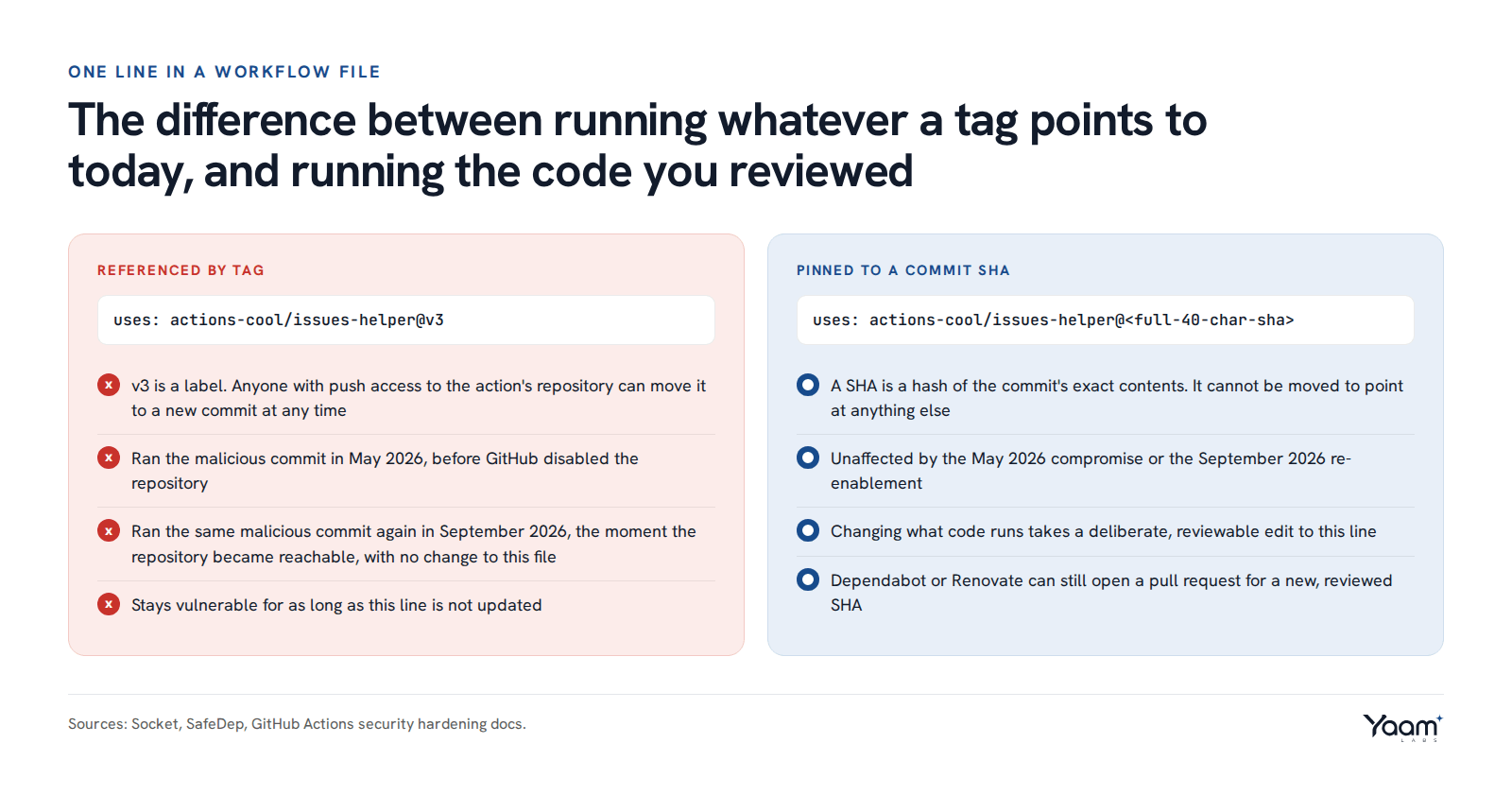
A Git tag is a label, not the code itself: it is a name pointing at a commit, and Git lets anyone with push access move that name to a different commit at any time. A commit's SHA is different. It is a hash computed from that commit's exact contents, so it can only ever refer to one thing, and there is no operation that makes the same SHA point somewhere else. That movable-versus-fixed difference is what let this incident happen twice.
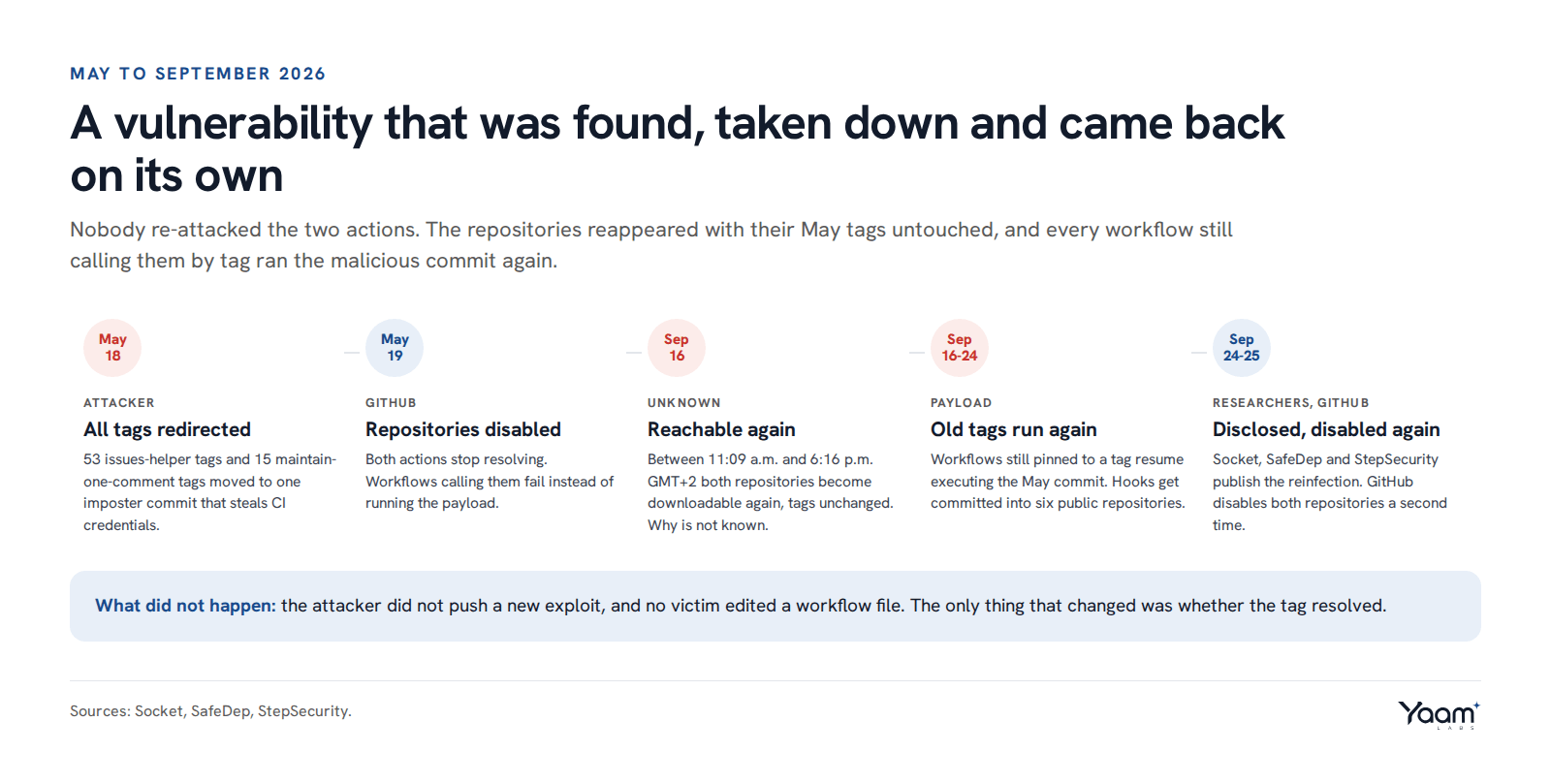
According to SafeDep, on May 18, 2026, at commits timestamped between 19:10 and 19:31 UTC, an attacker repointed all 53 existing tags of issues-helper and all 15 tags of maintain-one-comment to a single new commit that appears nowhere in either project's real history. A workflow step written as uses: actions-cool/issues-helper@v3 does not fetch a specific, reviewed version 3. It asks GitHub, at the moment that job runs, what commit the label v3 currently points to, and downloads whatever that is. GitHub disabled both repositories the next day, May 19, which broke tag resolution entirely: workflows calling either action started failing instead of running the payload, and the story read as closed.
Disabling a repository does not invalidate its tags, and that gap is exactly what let the malware come back. Between 11:09 a.m. and 6:16 p.m. GMT+2 on September 16, 2026, both repositories became reachable and downloadable again. GitHub has not said why. The tags were exactly as the attacker left them four months earlier, still resolving to the same malicious commit, so every workflow with a uses: line pointing at either action went from failing to succeeding, silently, and started running the same credential theft the next time it triggered. A workflow pinned to a full 40-character commit SHA would have been unaffected by either the May compromise or the September return, because the code a SHA resolves to cannot change regardless of what happens to the upstream repository.
What attackers are doing
The malicious commit runs on the Bun JavaScript runtime and reads the job's GITHUB_TOKEN, the ghs_-prefixed credential Actions mints fresh for each run, directly out of the memory of Runner.Worker, the runner process that holds decrypted secrets while a job executes. SafeDep reports the stolen token is sent to t.m-kosche[.]com over an endpoint styled to look like OpenTelemetry traffic, /api/public/otel/v1/traces, which blends in with legitimate monitoring calls leaving a CI runner. The domain has previously been tied to the wider Mini Shai-Hulud campaign through shared infrastructure with compromised @antv npm packages.
Because the stolen token is scoped to write to the repository the workflow runs in, the payload does not need to wait for a human operator on the other end to do anything with it. SafeDep found that between September 20 and 24, it had already used stolen tokens to commit backdoor files into at least six public repositories over GitHub's GraphQL API, including jd-opensource/micro-app (6,254 stars) and ant-design/pro-components (4,833 stars). The files were a .claude/settings.json defining a Claude Code SessionStart hook, a .claude/setup.mjs that downloads Bun and runs the real payload, and a .vscode/tasks.json that fires the same thing when a developer opens the folder in VS Code. That backdoor runs on the developer's own machine when they open the infected project, not on the CI runner itself, so a clean-looking Actions log does not mean a clean checkout.
What to do
- Search every workflow file your organization owns, including forks, templates and archived repositories still building on a schedule, for
actions-cool/issues-helperoractions-cool/maintain-one-comment. A repository-wide search foruses:.*actions-coolacross.github/workflows/*.ymlfinds both. Remove or replace either action immediately if found; do not wait for a patched release, since the same tags are the problem. - Pin every third-party action in every workflow to a full 40-character commit SHA, not a version tag or a branch name. GitHub itself documents this as the only way to treat an action as an immutable release. Change
uses: owner/action@v1touses: owner/action@<40-character-sha>, choosing a commit you have reviewed. - Once pinned, use Dependabot or Renovate configured for GitHub Actions to open pull requests when a new SHA is available, so pins stay current without going back to tags.
- At the organization level, restrict which third-party actions can run at all under Settings, Actions, General, "Allow select actions and reusable workflows," and add only the actions you have reviewed to the allow list.
- Check whether you were already hit: search your Actions run history for any run of a workflow calling either action after September 16, 2026. Check DNS and proxy logs from your runners for
t.m-kosche[.]com. In any repository those runs could write to, look for a.claude/settings.json,.claude/setup.mjsor.vscode/tasks.jsonyou did not add, or a commit from the Actions bot you do not recognize. - Rotate everything the affected CI job could reach: cloud provider keys, npm and PyPI publish tokens, deployment credentials and any secret exposed to that workflow's environment. A stolen
GITHUB_TOKENis scoped to one repository and expires with the job, but anything longer-lived that the job's environment also held should be treated as compromised.
If your pipelines still reference third-party actions by tag, our platform and cloud engineering team can move your workflows to SHA-pinned actions with reviewed update automation, and security operations can add detections for the exfiltration pattern above your existing CI logging. Open the chat and Yaali, our AI agent, will pass your question to an engineer.
Sources: Socket, SafeDep, StepSecurity, SC Media, The Hacker News, September 2026, The Hacker News, May 2026, GitHub Actions security hardening.
Read next
- GitLab file read flaw: older branches now have a fix
- MemTensor worm: when the release pipeline leaks its token
- Astrana Health breach: vishing spoofed its own number
Back to the blog, or tell us about your system in the chat. Yaali, our AI agent, answers first and brings in an engineer.